 Unnerd AI
You commented DIG
Unnerd AI
You commented DIG
DigUp: find any file on your Mac by describing it
Type what's in the file, not its name: "dog on the beach", "the clause about pets in my lease", "where they talk about sleep". DigUp finds it, all on your Mac.
Checked on 11 Oct 2026. Tools change fast, so the official page always wins if it says something different.
What it does
- Searches by meaning, not file names. Describe what you remember and it finds the match.
- Photos and screenshots: "a dog on the beach" finds the photo, and it reads the text inside screenshots too.
- PDFs and documents: "the clause about pets in the lease" opens the right page with your words marked.
- Recordings and videos: "where they talk about sleep" jumps to that minute.
- Exact words still work: invoice numbers, names and error codes.
- Private: everything happens on your Mac. No account, nothing uploaded.
What you need first
The GitHub page, explained
Free tools like this live on GitHub. Open github.com/ARahim3/DigUp and this is what you'll see at the top:
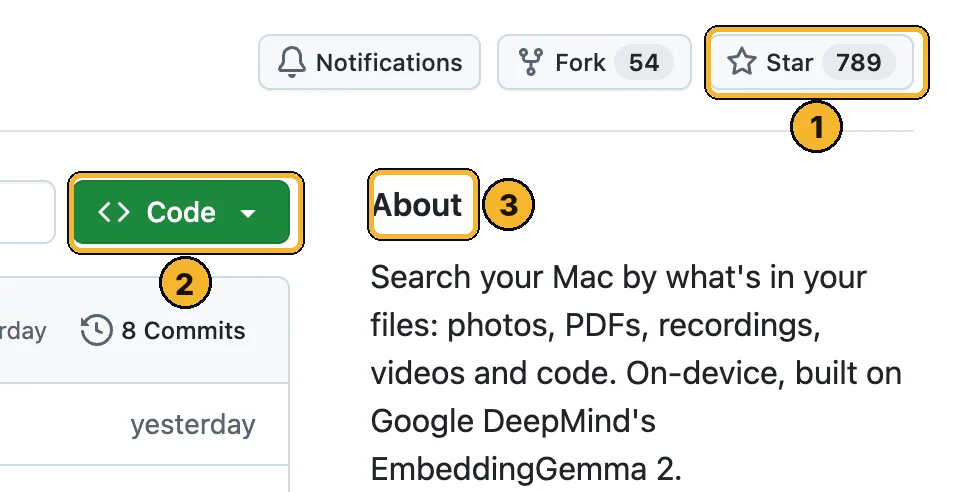
- Star (750+): how many people saved it. More stars means more people trust it. Clicking it is optional and needs a free GitHub account.
- Green Code button: the download button. You only need it if a step below tells you to.
- About: one line on what it does, so you know you're on the right page.
Scroll down the GitHub page to README: that's the creator's full manual. This page is the simple version.
Step by step
Download DigUp
Open the latest release, scroll to Assets and click the .dmg file.
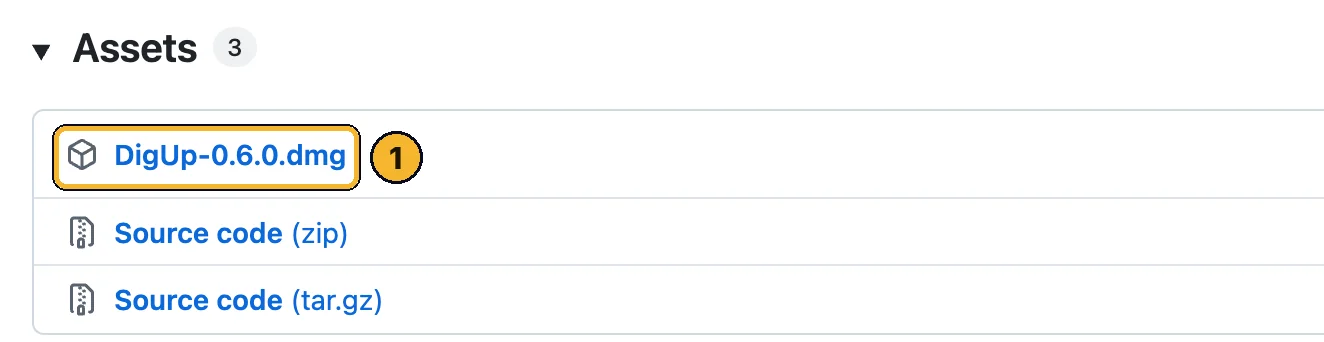
- DigUp-….dmg: the Mac app. Ignore the two Source code files.
Install it
Open the downloaded file and drag DigUp into Applications.
Open DigUp from Applications. It lives in the menu bar at the top of your screen.
Pick the folders to search
While the AI model downloads (once), choose the folders DigUp may read. Start with Downloads and Documents. It shows how long the first scan will take.
Tip: A big Downloads folder can take up to an hour the first time. After that, new files are searchable in a second or two.
Press ⇧⌘Space and describe it
From any app press Shift + Command + Space, then type what you remember. Press Return to open the result: videos open at the right moment, PDFs at the right page.
the clause about pets in my lease
Searches to try
Type these in the DigUp search panel (⇧⌘Space).
a dog on the beach
the receipt from the hotel in Rome
payment declined error
where they talk about pricing
invoice 1042
Prefer Homebrew?
Install it with brew install --cask arahim3/tap/digup.
Learn this with me
Live AI Masterclass
8 ways I make money with AI, built live step by step. Zero experience, no code, any age.
- Thu 15 Oct · 6pm UK · 1pm ET
- New date coming soon. See what you'll learn and the next date →
- 2 hours live + the replay
- $150 one time · only 10 seats
The Unnerd AI Club
Not a course. A step-by-step system to make money with AI: pick one money path and follow every step.
- 52 live classes a year
- Q&A 7 days a week + 1:1 calls with me
- $100/month · cancel any time
The catch
- Mac only for now. It needs a Mac with an M chip and macOS 14 or newer. Windows and Linux versions are being worked on, not released.
- It's brand new (version 0.6, 3 days old when checked), so expect bugs.
- Some users report high memory use if it's left open for a long time. Quit it from the menu bar when you don't need it.
- The first scan takes a while on big folders, and the model is an 865 MB download.
Stuck?
Nothing happens when I press ⇧⌘Space
It can't find a file I know is there
Is my stuff sent anywhere?
Official links
Want to go further?
I show a new AI tool every week, and how to make money or save hours with it. No tech background needed.
Unnerd AI · I'm not linked to DigUp, I just think it's useful.