 Unnerd AI
You commented FILE
Unnerd AI
You commented FILE
Filee: convert 180 file types on your own computer
Hold a key, drag a file, drop it on a format. PDF to Word, iPhone photos to JPG, Word, Excel and PowerPoint to PDF, e-books, ZIPs and videos. Free, offline, nothing uploaded.
Checked on 11 Oct 2026. Tools change fast, so the official page always wins if it says something different.
What it does
- A wheel of formats at your mouse. Hold Ctrl (Option on a Mac), drag files, drop them on the format you want.
- 180 formats: images (incl. iPhone HEIC), PDF, Word, Excel, PowerPoint, e-books, ZIP/RAR/7Z, CAD, fonts, video and audio.
- No Microsoft Office needed for documents, spreadsheets and slides.
- Batch: one file or a hundred at once. Merge PDFs, split pages.
- Watch folders: new downloads in a folder you pick get converted by themselves.
- Offline and private: the new file is saved next to the original. Nothing is uploaded.
What you need first
The GitHub page, explained
Free tools like this live on GitHub. Open github.com/KnifeLemon/Filee and this is what you'll see at the top:
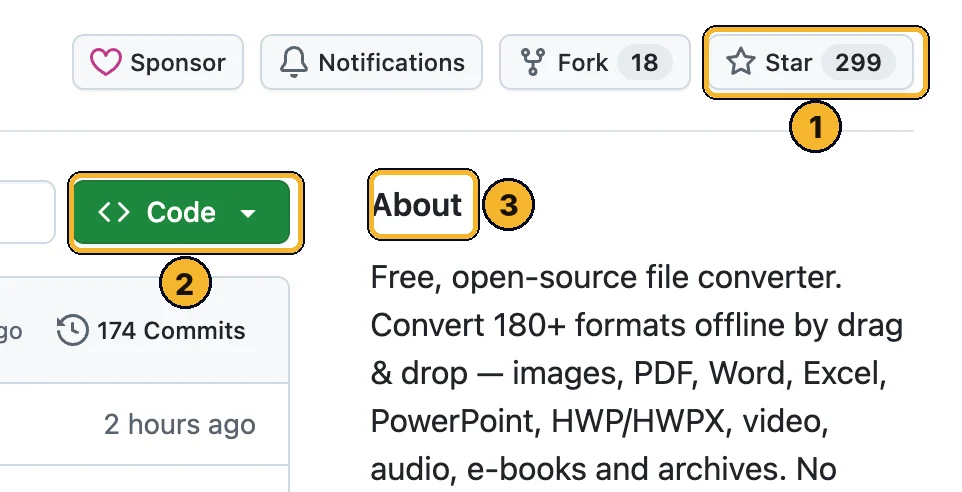
- Star (~300): how many people saved it. More stars means more people trust it. Clicking it is optional and needs a free GitHub account.
- Green Code button: the download button. You only need it if a step below tells you to.
- About: one line on what it does, so you know you're on the right page.
Scroll down the GitHub page to README: that's the creator's full manual. This page is the simple version.
Step by step
Download the right file
Open the latest release and scroll to Assets.
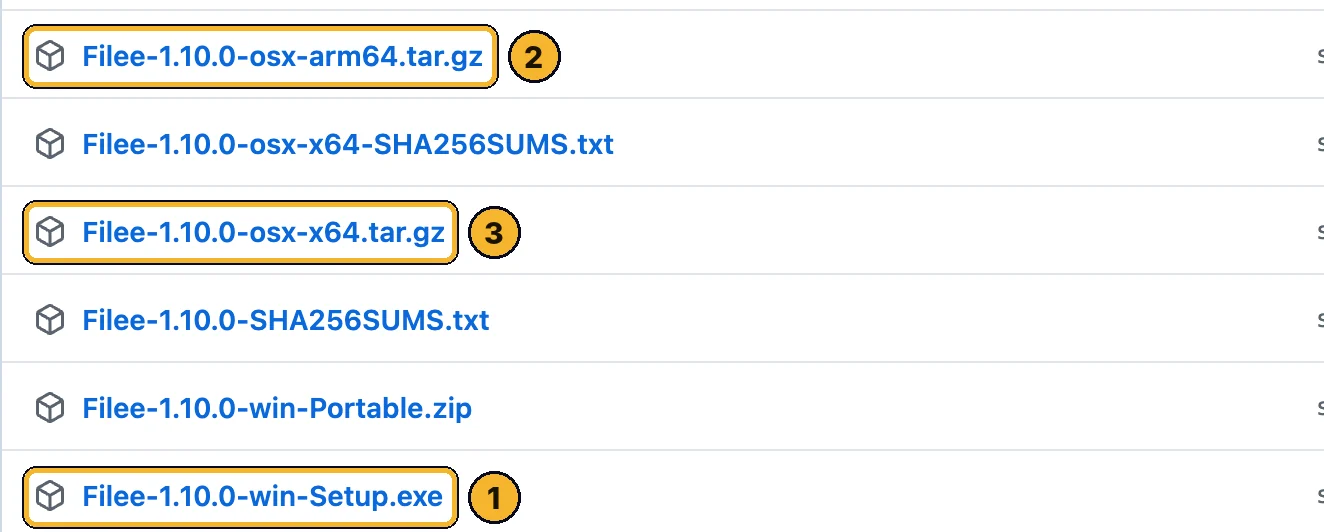
- …win-Setup.exe: Windows. Start here if you're on a PC.
- …osx-arm64.tar.gz: Mac with an M chip.
- …osx-x64.tar.gz: older Intel Mac.
Windows: run the installer
Run Filee-…-win-Setup.exe and allow it once. Tick FFmpeg if you want video and audio, and the File Explorer menu entry.
Mac: install the preview
Double-click the downloaded file to unpack it, open Terminal in that folder and run:
./install.sh
Tip: The Mac build isn't notarized yet: if macOS blocks it, go to System Settings → Privacy & Security → Open Anyway, then give Filee Accessibility permission. For video: brew install ffmpeg.
Convert something
Hold Ctrl (Option on a Mac), drag a file and drop it on a format in the wheel. The new file appears next to the original. You can also right-click a file → Convert with Filee.
Good first tests
Try one of these with your own files.
An iPhone photo (.heic) → JPG
A PDF → Word (DOCX)
A PowerPoint → PDF
Five PDFs → Merge PDF
An EPUB e-book → PDF
Like the command line?
Setup can add the filee command, for example filee convert photo.heic --to jpg.
Learn this with me
Live AI Masterclass
8 ways I make money with AI, built live step by step. Zero experience, no code, any age.
- Thu 15 Oct · 6pm UK · 1pm ET
- New date coming soon. See what you'll learn and the next date →
- 2 hours live + the replay
- $150 one time · only 10 seats
The Unnerd AI Club
Not a course. A step-by-step system to make money with AI: pick one money path and follow every step.
- 52 live classes a year
- Q&A 7 days a week + 1:1 calls with me
- $100/month · cancel any time
The catch
- It's not AI, just a very useful free tool.
- Videos and audio need a free add-on (FFmpeg, about 100 MB). Some rare formats need LibreOffice, calibre, Ghostscript or Pandoc, which it can fetch.
- The Mac and Linux versions are previews: the install has extra steps and may have rough edges.
- It's a young project (2 weeks old when checked), so check important conversions before you send them.
Stuck?
Nothing pops up when I drag
Video conversion is missing
Is anything uploaded?
Official links
Want to go further?
I show a new AI tool every week, and how to make money or save hours with it. No tech background needed.
Unnerd AI · I'm not linked to Filee, I just think it's useful.