 Unnerd AI
You commented LOGO
Unnerd AI
You commented LOGO
Logo Design Skill: Claude designs your logo and brand kit
Describe your business and Claude studies your industry, comes up with up to 12 ideas, draws the best 3, tests them and builds the full kit. Works on the free Claude plan.
Checked on 9 Oct 2026. Tools change fast, so the official page always wins if it says something different.
What it does
- Asks about your business first: the name, what you do, who it's for and the feel you want.
- Studies your industry with a library of 1,400+ reference logos, so it knows what your competitors look like.
- Comes up with 8 to 12 ideas and draws the best 3 as real logo files (SVG).
- Tests every logo: tiny (16 px), one colour, reversed, mirrored, squinted and next to competitors.
- Stops and lets you pick. It shows the concepts with a recommendation and waits for you.
- Builds the full kit after you pick: colours, logo versions, a mockup board, brand guidelines, SVG and PNG files, favicon and web icons.
What you need first
The GitHub page, explained
Free tools like this live on GitHub. Open github.com/kaankiziltug/logo-design-skill and this is what you'll see at the top:
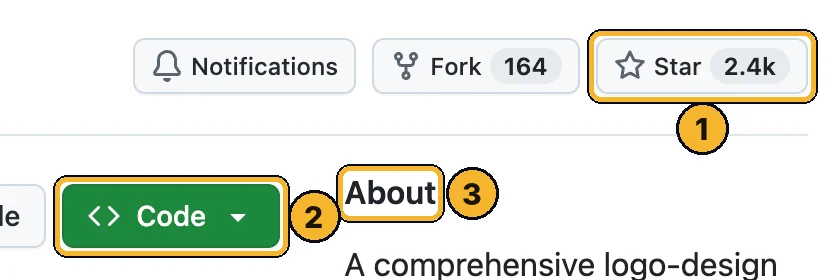
- Star (2.4k): how many people saved it. More stars means more people trust it. Clicking it is optional and needs a free GitHub account.
- Green Code button: the download button. You only need it if a step below tells you to.
- About: one line on what it does, so you know you're on the right page.
Scroll down the GitHub page to README: that's the creator's full manual. This page is the simple version.
Step by step
Download the skill file
Open the latest release, scroll to Assets and download logo-design.zip. Don't unzip it.
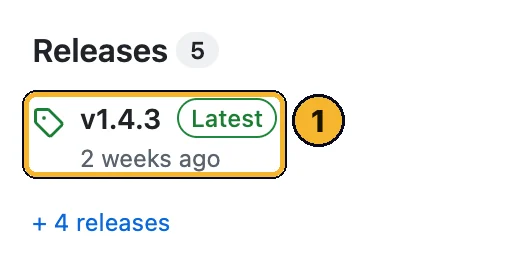
On the GitHub page, find Releases on the right (on a phone it's further down) and click the newest one ①.
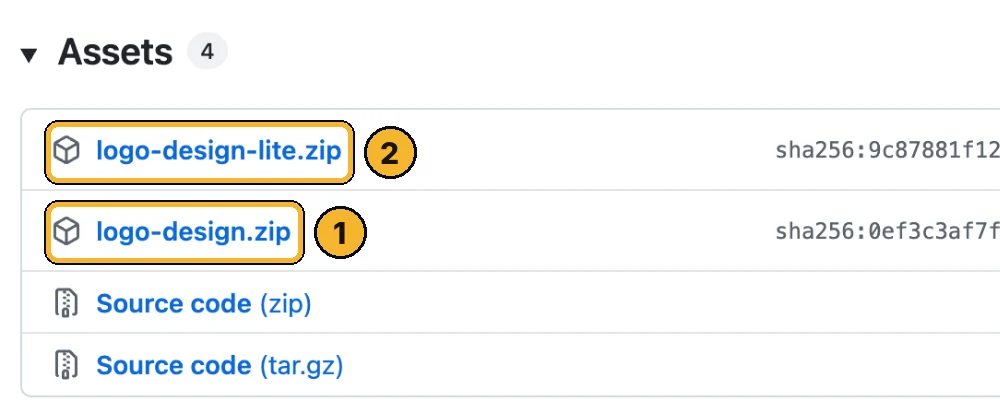
- logo-design.zip: the full skill. Start with this one.
- logo-design-lite.zip: much smaller (it leaves out the reference logo files). Use it if the upload says the file is too big.
Turn on code execution in Claude
In Claude (web or desktop app) go to Settings → Capabilities and switch on Code execution and file creation. Skills need it.
Tip: On a Team or Enterprise plan, the owner turns skills on in Organization settings → Plugins & skills.
Upload the skill
Go to Customize → Skills, click +, then Create skill → Upload a skill, and choose the zip.
Check it's switched on in your skills list.
Tip: Older Claude apps show this under Settings → Capabilities → Skills.
Give it your brief
Open a new chat and describe your business. The more honest detail, the better the ideas.
Design a logo for my business. It's called [name]. We [what you do] for [who your customers are]. I want it to feel [3 words]. Things I don't want: [anything].
Pick a concept, then get the full kit
It shows the concepts as one picture with its recommendation, then waits. Pick one (or ask for changes) and ask for the kit.
I like concept B. Make it a little bolder, then build the full brand kit.
Check it before you use it
Look at every file. Before you print signs or register anything, search your name and logo to make sure it isn't too close to another brand.
Things to ask it
Paste these into the chat once the skill is on.
Design a logo for my coffee shop called Kiln. Small-batch roaster, warm and modern, not rustic.
Show me the concepts tiny on a phone screen and in one colour before I pick.
Build the full brand kit for concept B: colours, logo files, web icons, mockups and brand guidelines.
Make a version of the logo that works on a dark background.
Using Claude Code?
Install it as a plugin instead. In Claude Code type /plugin marketplace add kaankiziltug/logo-design-skill, then /plugin install logo-design@logo-design-skill.
Learn this with me
Live AI Masterclass
8 ways I make money with AI, built live step by step. Zero experience, no code, any age.
- Thu 15 Oct · 6pm UK · 1pm ET
- New date coming soon. See what you'll learn and the next date →
- 2 hours live + the replay
- $150 one time · only 10 seats
The Unnerd AI Club
Not a course. A step-by-step system to make money with AI: pick one money path and follow every step.
- 52 live classes a year
- Q&A 7 days a week + 1:1 calls with me
- $100/month · cancel any time
The catch
- It's brand new. About two weeks old, from one developer, so expect rough edges.
- You're still the judge. Check every design with your own eyes, and use a designer for anything big.
- A full kit is a long job. The free plan has message limits, so it may stop part way. Come back later or use a paid plan.
- Check trademarks before you print signs or register a name. AI can land close to an existing logo.
- The 1,400+ reference logos belong to their owners. They're there to learn from. Never copy them.
Stuck?
I can't see Skills in Customize
The upload fails
Claude isn't using the skill
Can I use it for client work?
Official links
Want to go further?
I show a new AI tool every week, and how to make money or save hours with it. No tech background needed.
Unnerd AI · I'm not linked to Logo Design Skill, I just think it's useful.