 Unnerd AI
You commented TEAM
Unnerd AI
You commented TEAM
Claudex Loop: make Claude and ChatGPT check each other's work
Claude writes the plan, Codex tears it apart with proof, they go back and forth until it's approved. One builds it, the other inspects it. Whoever built it never grades it.
Checked on 11 Oct 2026. Tools change fast, so the official page always wins if it says something different.
What it does
- Plan first: it looks at your project and writes a plan with checks that prove it works.
- Second opinion from another company's AI: Codex (ChatGPT) reviews Claude's plan, or the other way round, with evidence for every finding.
- Back and forth: up to 5 rounds until the plan is APPROVED (or REVISE / BLOCKED).
- Build, then independent inspection: one builds it, the other inspects the final code in a fresh session.
- Newest models: works with Claude Fable 5.1 and GPT-6 Astra when your accounts have them.
- Claudex Route: a lighter skill that tells you which model should handle a task.
What you need first
The GitHub page, explained
Free tools like this live on GitHub. Open github.com/chaseai-yt/claudex-loop and this is what you'll see at the top:
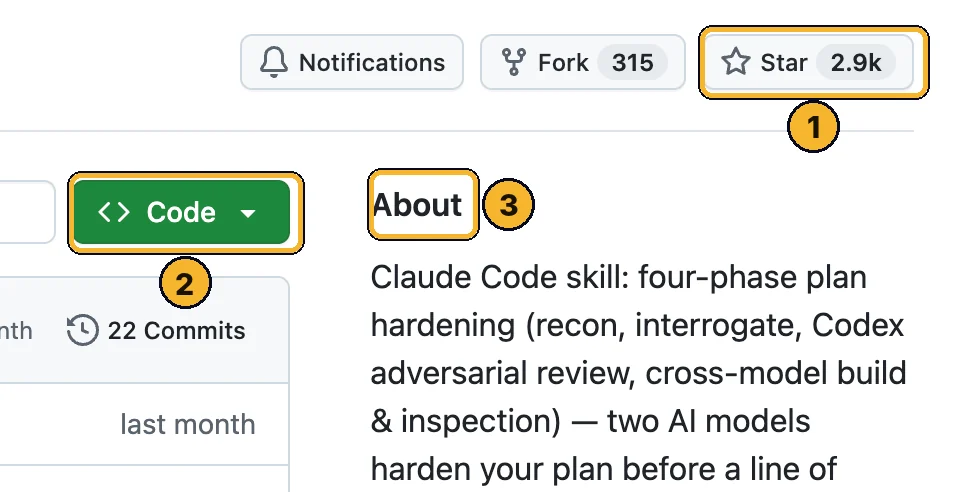
- Star (2.9k): how many people saved it. More stars means more people trust it. Clicking it is optional and needs a free GitHub account.
- Green Code button: the download button. You only need it if a step below tells you to.
- About: one line on what it does, so you know you're on the right page.
Scroll down the GitHub page to README: that's the creator's full manual. This page is the simple version.
Step by step
Install Claude Code
Run this in Terminal (Mac) or PowerShell (Windows), then log in:
curl -fsSL https://claude.ai/install.sh | bash
irm https://claude.ai/install.ps1 | iex
Install Codex and log in
Codex is OpenAI's coding agent. Install it, then run codex and choose Sign in with ChatGPT:
curl -fsSL https://chatgpt.com/codex/install.sh | sh
powershell -ExecutionPolicy ByPass -c "irm https://chatgpt.com/codex/install.ps1 | iex"
Tip: Check it worked with codex --version and codex login status.
Add Claudex Loop to Claude Code
Open Claude Code in your project folder and add the plugin:
/plugin marketplace add chaseai-yt/claudex-loop
/plugin install claudex-loop@claudex-loop
Run it on a small feature first
Describe what you want. It plans, gets Codex's review, then builds and gets an independent inspection.
claudex this feature — plan and implement it
Tip: Read PLAN-REVIEW-LOG.md before you approve the build. It shows every finding and the evidence.
Useful ways to run it
Type these in Claude Code.
claudex this feature — plan and implement it
claudex this plan, mode=review, plan=docs/plan.md, rounds=3
claudex-route: who should handle this task? Prioritize cost.
claudex-route: recommend a second opinion on this plan before we build.
Learn this with me
Live AI Masterclass
8 ways I make money with AI, built live step by step. Zero experience, no code, any age.
- Thu 15 Oct · 6pm UK · 1pm ET
- New date coming soon. See what you'll learn and the next date →
- 2 hours live + the replay
- $150 one time · only 10 seats
The Unnerd AI Club
Not a course. A step-by-step system to make money with AI: pick one money path and follow every step.
- 52 live classes a year
- Q&A 7 days a week + 1:1 calls with me
- $100/month · cancel any time
The catch
- You need two paid plans: Claude Code (Claude plan) and Codex (ChatGPT plan), and it uses limits on both.
- It's for people building apps and websites, not everyday chat.
- Two AIs agreeing isn't a guarantee. The README says it plainly: a clean result doesn't prove the model is right. Test it yourself.
- Setup is technical: two command-line tools and Python. Try it on a small feature first.
Stuck?
It says Codex isn't found
Which model does it use?
Can I only review a plan, without building?
Official links
Want to go further?
I show a new AI tool every week, and how to make money or save hours with it. No tech background needed.
Unnerd AI · I'm not linked to Claudex Loop, I just think it's useful.